Friday, July 18, 2014

All-in-one home entertainment (satellite TV + PVR, IP TV + apps, and Media Centre)

So I am still undecided on media-center / IP TV (Android, etc) and PVR combo .. I'd like an all-in-one am a little surprised why there isn't a clean one yet.

Bucket-list:

  1. 2 satellite receivers
  2. a couple of terrabytes of storage - for existing picture, music and movies + recorded stuff
  3. a media browser and viewer
  4. ability to run Internet apps either native or in browser such as Spotify, various On-demand sites, Youtube,  random web-sites etc
Given all that I could have an Android TV stick, a media centre and a PVR - but really? Each are developing at their own pace and the lines are blurring but still there seem big gaps. Surprising really .. Throwing asterisk in there to be able to make audio and video calls would be good too.

So this thread will be for experiments along this lines to see what works 

First cab off the rank (given I can take the PMD server offline for a bit) is GeexBox on my Raspberry Pi.

Thursday, September 5, 2013

GPIO frustrations

Having had issues getting my Raspberry Pi project working I stripped it down to debug what was actually happening.

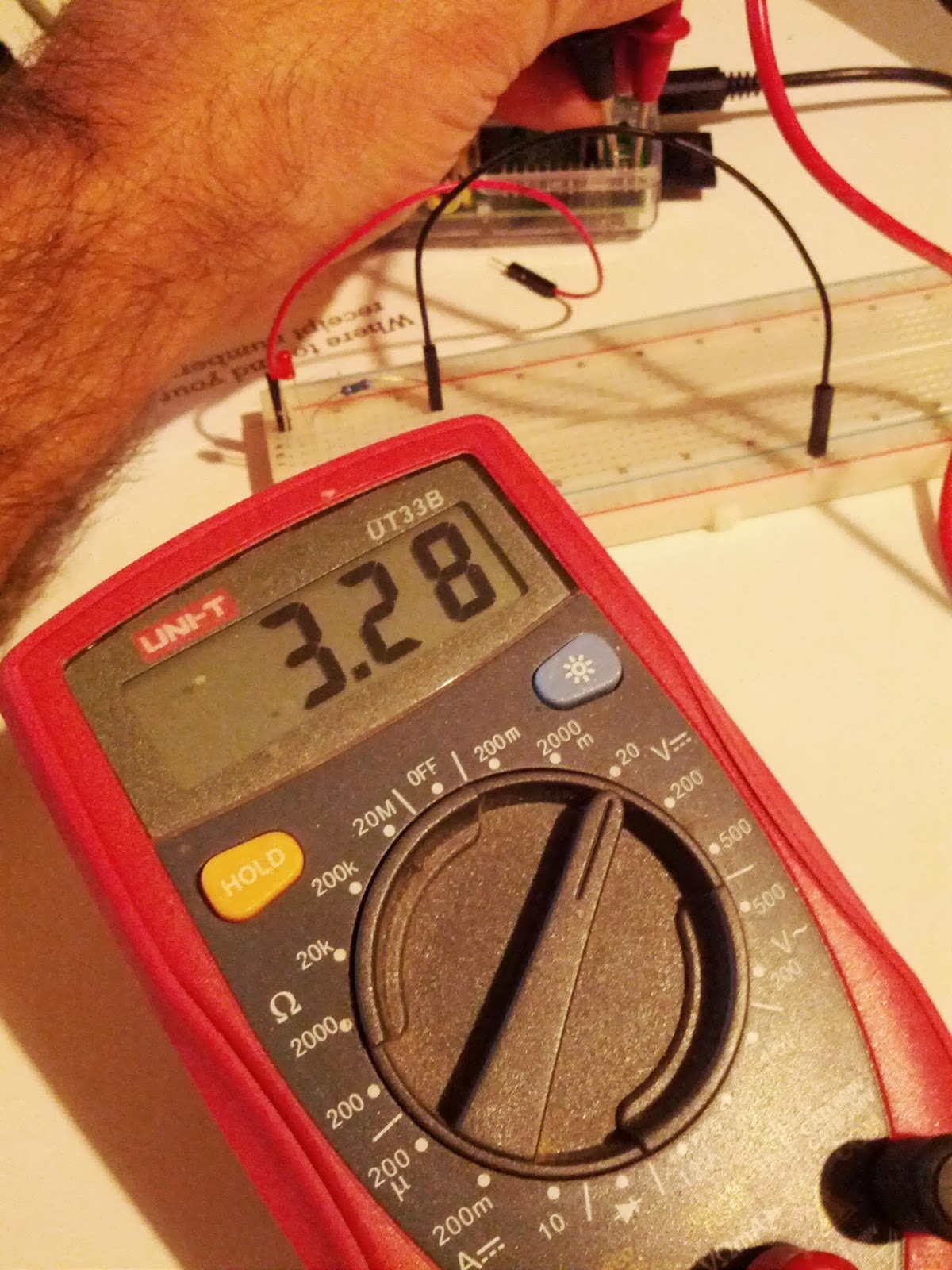
Turns out I can read 3V3 from P1 and P6 (ground) fine ..
No GPIO ribbon = 3V3

But when I connect my GPIO ribbon cable the voltage dropped to 1V6 stopping even my LEDs working with the 220R resistors I was using. OK so my understanding here may not be fantastic but checking resistance across the M-M wires is only 0.4 Ohms. Measuring again across GPIO ribbon using 2 leads remains at 0.4 Ohms.

Time to get some basic Female to Male leads and be done with it... any ideas as to why the GPIO ribbon is behind the voltage drop?

Monday, August 12, 2013

Some LibreOffice tricks


Batch convert LibreOffice files to PDF

sudo libreoffice --headless --convert-to pdf *.docx
Just does what it says on the tin .. easy as. Note: sudo is needed - thanks Jay http://listarchives.libreoffice.org/global/users/msg28788.html and https://bugs.freedesktop.org/show_bug.cgi?id=37531

LibreOffice won't start (unless --norestore is used)

I often shut-down my laptop without checking for working documents / emails in draft. Things are so reliable in general that I can start up and continue (generally also the docs / emails were no so important that I could just walk away from unfinished). Lately I've had had the issue that I just couldn't start LibreOffice .. I found --norestore but needed it every time.

Check for restore items in the following file and just delete them
~./.config/libreoffice//user/registrymodifications.xcu

Wednesday, August 7, 2013

Pixel CL-N3 Pin out

In case there are others out there tempted to but the pixel CL-N3 as opposed to the Canon one (or other generic). No comment yet on actual use but here are the pin-outs

Thanks to http://www.doc-diy.net/photo/remote_pinout/

Raspberry Pi project - shutter control on Canon 7D

OK so I'm embarking on my first 'real' Raspberry Pi hack. I've got one running as a music server but that's not really what it's all about. It's time to do some GPIO and maybe work my way towards some real electronics.

What I've selected as my first project is to replicate something that's been done before - getting the Pi to trigger the shutter on my partners Canon 7D. As per http://www.ohmypi.com/2013/06/16/control-canon-camera-using-raspberry-pi-gpio-rpi-gpio-how-to/ and many others out there.

Here is my shopping kit:

  • Raspberry Pi *
  • GPIO ribbon cable*
  • Basic Breadboard *
  • Jumper Wires 6" M/M Pack of 10
  • Asus USB-N10 **
  • 0.5W Metal Film 470K 1% resistors (8 pack) **
  • 2 x 2N222 NPN transistors **
  • Pixel CL-N3 
** thanks to Jaycar

Wednesday, October 17, 2012

Number 0Nxxxxxxx is currently OFFLINE

This is something that's been bugging me for a little while with my iax2 trunk to 2talk. Fundamentally I'm just a bit sow to get how it all hangs together. Generally it works out of the box so I don't 'need' to understand it to use it ... except it's good to know how it hangs together when things get weird.

That said some kind of recent change (possibly with 2talk plus account set-up) my registration died and 2talk showed me as 'OFFLINE' .. hmm.
*CLI> iax2 show registry
Host                  dnsmgr  Username    Perceived             Refresh  State
202.180.76.166:4569   N       0Nxxxxxx               60  Timeout

Ok so I'm not registered - but, I can make outbound calls ... odd? No - this is a clear description:
The only purpose of registration is to allow a device to identify its location on the network, so that Asterisk knows where to send calls intended for that device.

OK so I didn't change anything so perhaps I can force a registry reset / refresh, etc 

*CLI> iax2 unregister
Usage: iax2 unregister
       Unregister (force expiration) an IAX2 peer from the registry.
Hmm .. not helpful - I can't figure out what the peername is .. a few attempts from iax2 show peers to get the name don't seem to help. So I default to a fallback option - change the registry string to something wrong, reload asterisk, then change in back .. maybe. 

So I choose (rather fortuitously)  to replace:
0Nxxxxxx:@iax.2talk.co.nz 
with
0Nxxxxxx:@iax.plus.2talk.co.nz 
and  guess what, it works .. well maybe a change to the 2talk+ accounts? I can't find a reference say here http://blog.2talk.co.nz/iax2.html or  here http://www.2talk.co.nz/2talkplus/ . I've created a ticket so will see what they say.

*UPDATE* apparently if you're on 2talk+ you should always use .plus .. so looks like the last related change got pushed through and they've stopped supporting registration on the old domain. OK.

Tuesday, October 16, 2012

Nexus 7 - Office tablet - it's time to go paperless people

OK so after moving to Auckland to start a fledgling branch of the company I work for I'm thinking about operational readiness. And, next on my list is a printer/scanner/copier .. or is it? So I don't want toner cartridges or paper jams or manual duplex or whatever. Furthermore all the cool kids up here just take a tablet to meetings and with the features of Adobe Reader X (i.e. highlighting and freehand overlays) I'm thinking a tablet is a better first choice and aim to go paperless.

So having considered (and discarded .. for now) the Samsung Note 10 I have opted for a Nexus 7. So far so good - will update .. just opted for Wifi model to keep it cheap and simple but aside from tethering issues (easily getting documents on it before a meeting) we're up and running.


Phones can be hotspots - but what about laptops?

So here I am chewing through mobile data and surely I don't need to buy and set-up a permanent wifi AP when I want the odd bit of wireless data. Normal process follows - ask google what ubuntu can - wifi tethering?

Turns out 'yes' and some good instructions are forthcoming on askubuntu.com but (aside from only seemingly supporting WEP and some IPv6 issues) I don't see a hotspot?

The answer - via http://askubuntu.com/questions/76981/cannot-make-wi-fi-hotspot

 $ sudo iw list | less
   ...         
 Supported interface modes:
                 * IBSS
                 * managed
                 * monitor

 so no AP and so hardware does not support being an AP. Bummer - but good to know.

Tuesday, September 18, 2012

Samsung Vehicle Dock Kit for Galaxy Nexus

OK so I love car docks .. I bought a Google Nexus One and forked out for a custom Google car dock (shipped from Europe at no small expense). So now I have a Galaxy Nexus it was just a matter of time before I caved in and got a car dock. I found one discounted on MobiCity (parallel importer in Wellington) - not cheap but acceptable at the time.

So now it's arrive - time to unpack. 


OK so straight up this is a nice looking car dock. Time to put my phone in .. OK it is a very very tight fit - will be interesting to see how it goes in the car ..it's a 2 handed operation. All in all look an feel and operation is so far a Rating: 4/5

Not having yet plugged it in (and in doing so triggering the bogo pins into action) I start looking to download the google car dock app .. oddly it't not available for 4.x .. hmmm. Once usb is connected to the dock however - bingo the base home screen goes landscape and the view is quite tidy .. so I might be fine as is. What is particularly nice is the voice activation icon on the bottom left.


Just by fooling I'm finding the voice activation is quite cool but my results to date are well below 50/50 however:
  • CALL call such as "call fred mobile" rarely if ever seems to work.. the more words you say the lest likely it is to succeed Rating: 1/5. Simplifying to call such as "call fred" can work well for simple names ... I don't hold out much hope that it'll replace typing / touch in the car but it can help to reduce typing by bringing up search results Rating: 2/5
  • DRIVE drive such as "drive home" works well for simple preset destinations - the integration here with google maps online is pretty awesome. That said if I ever try "drive Quay street Auckland" the best I get is "drive key street waltham" .. not likely to work at any level of acceptability .. possibly my accent - enunciation is very definitely important  Rating: 3/5 (for the saved locations and maps integration)
  • LISTEN listen to a-la "listen to the x x" .. so far only succeeds in starting my preferred music player (PowerAMP) with a failed search .. but a one touch from here to folders so Rating: 2/5. That said to be able to support 'start music' and 'stop music' simply activating/deactivating your preferred music player would be a 5/5 for me. How about "drive home" "start music " .. that would be cool.
  • SEND send text to along the lines of "send text to matthew hello" .. this finally worked on about the fifth attempt after giving up on a couple of other names. Once I got it working I still needed to choose a matthew as I have a few in my contacts .. unlikely to use this with much success Rating: 0/5. Given sending a text was not super successful you can imagine how much success was in store for email .. send email quickly yields results .. but once you have a email editing dialogue .. well, good luck to you.

A complete list of valid actions can be found here http://www.google.co.nz/mobile/voice-actions/

Also note my voice settings are for 'English (UK)' and I have this downloaded to be able to work offline. Phone search is across People and Play Music.

403 Google Play issues?

OK so these were driving me nuts .. seriously. Lots of online comments about deleting caches, removing Google accounts, etc, etc .. until I read this link

The solution - remove the proxy on your Mobile network APN .. WTF .. don't ask me why but it worked. I do a bit of mobile testing so I remembering adding it but how / why it makes google think there is a authentication issue is a bit beyond me.

Sunday, July 15, 2012

Getting to grips with Unity ... MyUnity

I've also been through my share of Debian based distros pre Ubuntu such as Storm and Knoppix. I briefly tried dabbling with non-Debian distros (Redhat and Centos) but just didn't like it. I'v esince settled happily with Ubuntu.

Having initially started with Windowmaker I would now say I'm an established Gnome (+ metacity) user. I tried KDE but it didn't work for me .. actually it worked just fine - I simply prefer the Gnome look-n-feel (maybe the big paw print struct a chord .. who knows). I wanted to like OS X but couldn't (the app / window thing .. no sorry).

So in summary I've been very happy with Ubuntu and Gnome ... until I upgraded and got Unity. Previously I tried Enlightment but reverted - but I didn't get it by default. With 11.04 I hunted and found out how to remove it - I succeeded but now on 12.04 I 'm getting constant dialog errors, etc, etc .. so I'm thinking it's time to create a new user with default settings to see if I've broken things. Along the way I'll check out Unity.

So this post is a bit about me trying Unity - hopefully positive, and capturing the little customisations, things I like and how I've managed to set them up in Unity.

Now that I'm on 12.04 I've found MyUnity .. things are looking up .. temporarily :)

Things I like

Focus follow mouse 

Easy to configure with gnome-tweak-tool and it doesn't seem to be a bad thing - i.e. it won't break Unity. Ref: http://askubuntu.com/questions/64605/how-do-i-set-focus-follows-mouse

Summary: gnome-tweak-tool is good.

Application menu in panel

A bit weird to me but I'm getting used to it (bit Mac-ish maybe?). When you have multiple windows of different apps and focus following the mouse this is a bit of a fail.

Summary: Still not convinced


Lots of horizontal workspaces 

I'm trying to figure out the how Untiy will let me keep working with lots of horizontal workspaces - myUnity can configure them  yippeee .. ah no - It seems I'm running Unity-2D (see http://askubuntu.com/questions/136324/always-boots-into-2d-mode) and likely my hardware doesn't support anything more advanced (Toshiba Portege m800).

Summary: OK so now we start failing big time


Also .. what about dragging and dropping windows in the workspace panel app thing ???

So MyUnity doesn't allow me to configure all the fancy stuff .. but some of it is not really that fancy? Why can't I configure the number or rows / columns of workspaces. Arrrgh.

So what to do - sadly I'll need to try gconf-editor and try and hack away without breaking things.

I'll update as I continue but it just seems Unity is too aggressive a proposition. There's too much lost functionality .. hey I 'could' do some good stuff .. but I can't. The Unity upgrade didn't come with a box full of free hardware.

Tuesday, July 3, 2012

Icon HDP for SPDIF Cubox audio

http://www.internationaldynamics.co.nz/ are the NZ distributor of the Icon HDP for $799.

This looks like a very tidy option give it's time for me to make use of SPDIF audio on the cubox.


Cubox [Part 3]: Revisited .. Asterisk 1.8 issues

Turns out there is no sound on out-bound calls so my claims of success were a little premature.

I've been trying to diagnose - asterisk debugging is not super easy to follow and nothing cries PANIC. A good way to test was to use call-recording feature on 2talk and then test outbound call to mobile (using a friend to talk on one and you on the other is easiest ;). If both voices are recorded then obviously 2talk is receiving both and having issues thereafter (simple and obvious but seems to confirm that 2talk are passing on what they receive).

Searching around I see some notes on similar (no/extremely choppy audio on outbound call issues) such as https://issues.asterisk.org/jira/browse/ASTERISK-16258

Some things to try to resolve this.

Also review iax show netstat maybe the lack of sound is due to issues with load encoding on the fly, etc.

Sunday, June 17, 2012

Cubox USB bus limits?


Starting to see some USB bus contention / limits being hit on cubox (ref: http://www.solid-run.com/phpbb/viewtopic.php?f=9&t=635)


I have 2 usb sounds card(s) and 1x usb HDD (will move to eSATA when I get a new housing) running off an unpowered hub on USB bus 2 .. i.e.


root@cubox:~# lsusb
Bus 002 Device 020: ID 0d8c:000c C-Media Electronics, Inc. Audio Adapter
Bus 002 Device 019: ID 0bc2:3300 Seagate RSS LLC 
Bus 002 Device 018: ID 145f:0090 Trust 
Bus 002 Device 017: ID 05e3:0606 Genesys Logic, Inc. USB 2.0 Hub / D-Link DUB-H4 USB 2.0 Hub
Bus 002 Device 001: ID 1d6b:0002 Linux Foundation 2.0 root hub
Bus 001 Device 001: ID 1d6b:0002 Linux Foundation 2.0 root hub

The USB HDD is powered .. I've seen other posts recommending using a powered hub and ensuring devices are shared over the 2 ports .. any limits here. I was hoping to run a second USB HDD to pair the existing for back-up. Over-night I found mpd had stopped (possibly during maintenance - still investigating). During 'working' operation MPD is, on occasion, reporting ..


Jun 17 09:20 : output: "Lounge Speakers" [oss] failed to play: Write error on /dev/dsp2: Broken pipe

I'm also seeing the following in syslog

Jun 17 09:20:34 cubox kernel: [829633.363960] orion-ehci orion-ehci.1: sitd_submit: can't schedule iso stream
Jun 17 09:20:34 cubox kernel: [829633.373964] cannot submit datapipe for urb 0, error -28: not enough bandwidth
Jun 17 09:20:34 cubox kernel: [829633.390285] orion-ehci orion-ehci.1: sitd_submit: can't schedule iso stream
Jun 17 09:20:34 cubox kernel: [829633.397412] cannot submit datapipe for urb 0, error -28: not enough bandwidth


Friday, June 8, 2012

Cubox [Part 4]: usb wifi + kernel build

Ideally a Ralink so I grabbed a cheap D-Link Wireless N 150 USB adapter:


[93379.042492] usb 1-1: new high speed USB device using orion-ehci and address 2
[93379.211469] usb 1-1: New USB device found, idVendor=07d1, idProduct=3c16
[93379.218616] usb 1-1: New USB device strings: Mfr=1, Product=2, SerialNumber=3
[93379.226201] usb 1-1: Product: 11n Adapter
[93379.230249] usb 1-1: Manufacturer: Ralink
[93379.234729] usb 1-1: SerialNumber: 1.0
[93379.240455] usb 1-1: configuration #1 chosen from 1 choice
[93861.002520] backlight power down

Debian wiki shows the way forward http://wiki.debian.org/rt2870sta 

Sadly the modules that have been built for the stock kernel .. however in the wonderful world of openness the lovely folk at solid-run.com have the kernel on github   https://github.com/rabeeh/linux-2.6.32.9 so I can simply clone it and build (no huge reason to make a massive jump yet).

Watch this space ...

Cubox [Part 3]: + Asterisk 1.8 .. fully operational

As mentioned I rebuilt the Cubox with Debian 'squeeze' and got mpd running (see previous post). The bigger hurdle for me was to get Asterisk running and complete migration of an old Centos / Trixbox set-up .. Centos was just too awkward for me.


Failing

I began fooling around trying to migrate the config from the Trixbox server to the default Asterisk config files that came installed via apt-get on squeeze. Whilst both were 1.6 I realised the Trixbox ones were quite modified in set-up by use of freepbx gui to configure them. I got to the point where I was coping over the php agi scripts to find they weren't php5 compliant ... OK this isn't going to work cleanly .. back it up.

Thinking about it:
I'm actually pretty happy with freepbx I just don't want the Centos that Trixbox comes with
My Asterisk config is actually pretty simple
  1. 1 x IAX2 trunk 
  2. 1 x SIP trunk 
  3. 1 x out-/in-bound routes 
  4. 1 x Ring Group (ring all extensions .. in NO ANSWER hand over to VM IVR) 
  5. 1 x VM IVR (leave message for whom?) 
  6. 3 x Extensions (2000 - Dect phone, 2001 - Me, 2002 - Mrs and more to follow I'm sure) 
.. so decided to change tack.

Thursday, June 7, 2012

Cubox [Part 2]: mpd, usb HDDs and sound cards

Not much to say .. all just an apt-get install and migrate over from old music server.


I have /etc/fstab with labels set-up for the USB HDDs (only one operational but I will boot two for back-ups).

Also need to monitor power consumption as I plan to have 4-5 USB devices hanging off a usb hub - only the drives are powered.


Sandisk to the rescue

OK so I have a lovely Cubox that boots off a micro SD card and also have Android mobile phones in the house with similarly sized SD cards. But .. I can't find the Micro / SD card thingy that you can put one in side the other to read it ..

Since my mobile needs to be rebooted every time I extract the microSD card it was apparent a decent solution would probably be useful. I can happily recommend the usb adapter that I found at my local DSE store for $20.

http://www.sandisk.com/products/readers-accessories/mobilemate-duo


Also qudos to the DSE sales rep who recommended I check trademe.co.nz as I'd find one for $5 + shipping .. my student days are over .. I wanted one now.

Cubox [Part 1]: the arrival + Debian 'squeeze'

My first (and I say first for a reason) Cubox arrive from Solid-run this week. The reason I got the first one:

  • Cheap as (99 euro)
  • Need a fan-less music and phone system (mpd and asterisk) 


Experience to date


Breaking it

Booted out of the box with an HDMI cable plugged into the TV but without a network cable or adapter handy this was short lived but proved all should play nicely. Booting it directly with a network cable (headless) worked fine - check for host 'cubox' on list of router dhcp leasesfor ip address. ssh'ing in was fine given default 'cubox/cubox' and 'root/cubox' details .. all good.

Next steps were:

  1. leave the default Ubuntu 10.04 on there for a quick set-up of what I need
  2. install music server (sudo apt-get install mpd)
  3. install asterisk (sudo apt-get install asterisk, etc)
  4. update all packages (it said some were needed) ... error .. almost bricked it .. 

Well almost. I simply trashed the boot process as some of the new packages simply didn't work leaving me with a busted install and kernel panic's .. don't do an apt-get upgrade if you want to keep it working.


Fixing it

OK so rather than try and figure out where the base system could be restored from (take a back-up people - dd the whole MMC card would be my future recommendation .. that is if you want to go back to it .. I don't really want to).

Next steps:

  1. get serial access sorted - nicely documented here, no problem - refresh your screen commands - this worked best for me.
  2. choose a distro - I'm picking debian - http://www.solid-run.com/mw/index.php/Debian_on_CuBox
    1. lot's of udev issues with wheezy so I'm going back to squeeze - consider http://www.solid-run.com/phpbb/viewtopic.php?f=11&t=323#p1010
  3. run with basic ssh server only set-up and copy over kernel / boot images.
Some hints I found useful fixing this issue:
  •  If you find yourself booting a usb kernel numerous times to get the MMC card back operational again, cat /proc/partitions to find the name soyou can mount the boot partition
  • As per this post make sure your boot partition contains a /boot directory ;)

Monday, April 16, 2012

One months 2talk's VoIP service < One days parking in Wellington city

Looking at bank statements this just caught my eye .. crazy how relative costs pan out.

Base rate for a fixed IP and SIP trunk = $11.50.

Early bird Wilsons Car-park in Upper Willis Street Wellington = $12.